Configuring Balancing Redistribution
Use Balancing Redistribution to conditionally distribute a calculated forecast value for a group of meters based on whether the difference of two summed sets of meters is positive or negative. The two sets of meters represent a Sum of Receipts ( S Receipts ) and a Sum of Deliveries ( S Deliveries ). For example, this method of redistribution can assist you to make decisions about moving gas to and from storage as needed, or balancing gas receipts and deliveries across a pipeline.
For a Positive Value Distribution, if the S Receipts – S Deliveries > 0 (is positive), the aggregated forecast value for a group of meters will be distributed to the configured set of child meters.
For a Negative Value Distribution, if the S Receipts – S Deliveries < 0 (is negative), the aggregated forecast value for a group of meters will be distributed to a different configured set of child meters.
The distribution supports both a configured percentage assignment value (Fixed Quantity Assignment method) and a historical time offset forecast profile method (Balance from Historical Profile Assignment method). See Configuring Assignment From Parent for more information.
Note: See Configuring Expression Redistribution for information about Redistribution by expression.
To Configure Balancing Redistribution
- Click the Meters/Owners page of the ELF Editor.
- Add a New Child or New Sibling, or double-click to Edit a configured meter.
- Configure the properties in the General page.
- Click the Assignments page.
- Click Balance Redistribution from the Value Assignment Type drop-down menu.
- Click Create New Rule… or Edit Meter's Rules… or Add to Existing Rules… to view the Edit Balancing Redistribution Rule dialog box.
- Configure the rule using the properties described below.
|
Edit Balancing Redistribution Rule |
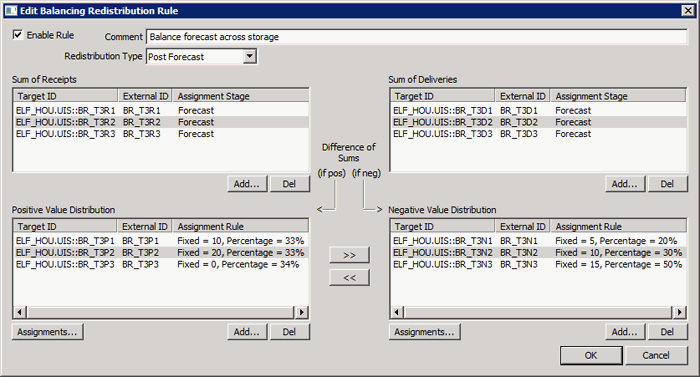
The properties and buttons on the Edit Balancing Redistribution Rule dialog box are described below.
| Parameter | Description |
|---|---|
|
Click to enable or disable the balancing redistribution rule. |
|
|
Type an optional description or reason for the balancing. Maximum length is 80 characters. |
|
|
Select the redistribution type to indicate when during the forecasting process to have redistribution occur. Options include:
|
|
|
Specifies the source meters in the Sum of Receipts group. Columns include the Target ID, External ID, and Assignment Stage for each meter.
Note: The Assignment Stage for the source meter(s) must match the Redistribution Type. |
|
|
Specifies the source meters in the Sum of Deliveries group. Columns include the Target ID, External ID, and Assignment Stage for each meter.
Note: The Assignment Stage for the source meter(s) must match the Redistribution Type. |
|
|
For a Positive Value Distribution, if the S Receipts – S Deliveries > 0 (is positive), the aggregated forecast value will be distributed to this set of child meters. Columns include the Target ID, External ID, and Assignment Rule for each meter.
|
|
|
For a Negative Value Distribution, if the S Receipts – S Deliveries < 0 (is negative), the aggregated forecast value will be distributed to this set of child meters. Columns include the Target ID, External ID, and Assignment Rule for each meter.
|
|
|
|
Click to move a destination meter from a positive distribution to a negative distribution, or from a negative distribution to a positive distribution. |


Validation Errors
If the balancing redistribution rules are misconfigured in any way, validation errors will be displayed at the bottom of the dialog box. Errors must be resolved before OK is enabled.


